 HandyArchive
Atomic Time Clock Synchronization utility
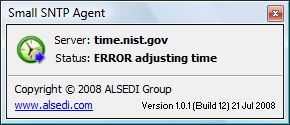
Small SNTP Agent 1.1
This is a Freeware SNTP (Atomic Time Clock Synchronization) utility.
Add SmallSNTPAgent.exe to your StartUp folder and your computer clock
will be adjusted every Windows startup.
Small SNTP Agent uses SNTP servers listed in servers.txt file. You can
add or remove servers - just edit servers.txt file. If one server
fails next one used. Program closes on successful synchronization.
Command Line Parameters:
/silent - no progress window shown.
/random - use servers from servers.txt in random order
/nolog - do not log synchronization results into SmallSNTPAgent.log file
/delay:X - Wait for X seconds before synchronization starts
Small SNTP Agent is a part of Perfect Clock software: http://www.perfect-clock.com
Add SmallSNTPAgent.exe to your StartUp folder and your computer clock
will be adjusted every Windows startup.
Small SNTP Agent uses SNTP servers listed in servers.txt file. You can
add or remove servers - just edit servers.txt file. If one server
fails next one used. Program closes on successful synchronization.
Command Line Parameters:
/silent - no progress window shown.
/random - use servers from servers.txt in random order
/nolog - do not log synchronization results into SmallSNTPAgent.log file
/delay:X - Wait for X seconds before synchronization starts
Small SNTP Agent is a part of Perfect Clock software: http://www.perfect-clock.com