 HandyArchive
Realistic recovery with Access recovery tool
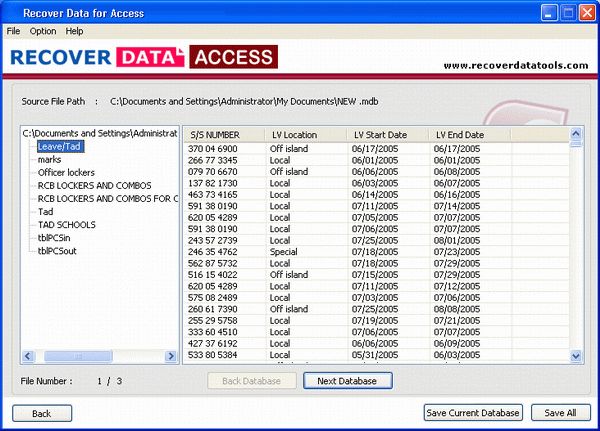
Real Microsoft Access Recovery Software 1.0
MS Access Repair Software is developed and tested in world-class laboratories. It recovers the lost files and repairs the damaged data within a few minutes. The whole procedures go uninterrupted and bring back complete data with speed. It also get back files from the formatted drive.
Access Repair Tool provides great convenience with:
Graphical User Interface (GUI)
Guided File Excavation Techniques (GFETCH)
Advanced heuristic and other algorithms
Complete recovery, repair
Total restoration in the original format
Recovery of macro, form, report, query, table, index, etc.
Recovery of table fields like auto number, OLE, hyperlink
Recovery of multiple file in a go
Supports latest versions of Access and Windows
Free demo and free trial
Do-it-yourself software
How to implement the tool?
Download and install the software from an authentic site. Launch the application and browse the MDB files. Now, recover and repair the files. Select files from preview and save in location of your choice.
Why Recover Data?
Recover Data is known for its excellence throughout the world. It has been a Microsoft Certified Gold Partner and its Access recovery solution has been awarded as the best among other counterparts.
Animated demo and effective trial
The company proffers an interactive demo for product implementation. It is best to know about the procedures and get back data within minutes. However, trial is actual software, which recovers complete data and provides preview before restoration. It gives you what you require and is therefore a final call before purchasing the full volume of the software.
Access Repair Tool provides great convenience with:
Graphical User Interface (GUI)
Guided File Excavation Techniques (GFETCH)
Advanced heuristic and other algorithms
Complete recovery, repair
Total restoration in the original format
Recovery of macro, form, report, query, table, index, etc.
Recovery of table fields like auto number, OLE, hyperlink
Recovery of multiple file in a go
Supports latest versions of Access and Windows
Free demo and free trial
Do-it-yourself software
How to implement the tool?
Download and install the software from an authentic site. Launch the application and browse the MDB files. Now, recover and repair the files. Select files from preview and save in location of your choice.
Why Recover Data?
Recover Data is known for its excellence throughout the world. It has been a Microsoft Certified Gold Partner and its Access recovery solution has been awarded as the best among other counterparts.
Animated demo and effective trial
The company proffers an interactive demo for product implementation. It is best to know about the procedures and get back data within minutes. However, trial is actual software, which recovers complete data and provides preview before restoration. It gives you what you require and is therefore a final call before purchasing the full volume of the software.