This program is a virtual library where you can store all your text documents, notes, poems or novels, you can keep your diary or write articles etc...
Live Help India is a leading Virtual Assistant Services and Part-Time/ Full-Time Virtual Staff provider company having facilities in USA, UK and Indore India. We are providing outsourcing services since year 2002.
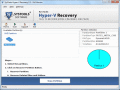
Damaged Virtual file repair tool is able to repair damaged Virtual file along with all items of Virtual partition. This tool deeply scans and repair data of damaged Virtual file without any alteration. So, try this damaged VHD file repair tool today.
Execute Virtual Server 2012 recovery task by use of excellent VHD recovery tool. Proficiently recover data from Virtual Server 2012 by repairing all corruption issues. Some unique features make the task to recover Virtual Server database easy.
Ever wished you had several screens on your computer? Active Virtual Desktop is a virtual desktop manager which will create up to 9 virtual desktops allowing you to have different programs running on each of them.
Windows 7 Virtual PC recovery software is an excellent tool that has the capability to make VHD data recovery from Virtual machine. Run Windows 7 Virtual PC file retrieval application & get 100% recovery of Windows 7 Virtual PC data with accuracy.
Virtual partition recovery software is to recover files from VHD corruption easily. Install Virtual partition data recovery software &perform to recover Virtual disk partition in a frequent of time. Try it & recover data from Virtual partition.
Free virtual desktops manager. Features include: User defined hot-keys; Copy/Move windows; Tab styles; Multiple monitors support; Drag & drop between tabs; Launcher capability; Some windows on all tabs; Auto-hide and semi-transparency
With Virtual Disk you can keep all your files organized, ready to use from any application. Your files are accessed from a virtual drive that allows you to freely reorganize your files without copying or moving them.
Create Virtual Drives from long paths, it's easy! Browse to the full path, choose a drive letter and Click [Add Virtual Drive]. Make CD-ROMs obsolete, copy the contents of the CD-ROM to your Hard Drive and run the CD from there.
 HandyArchive